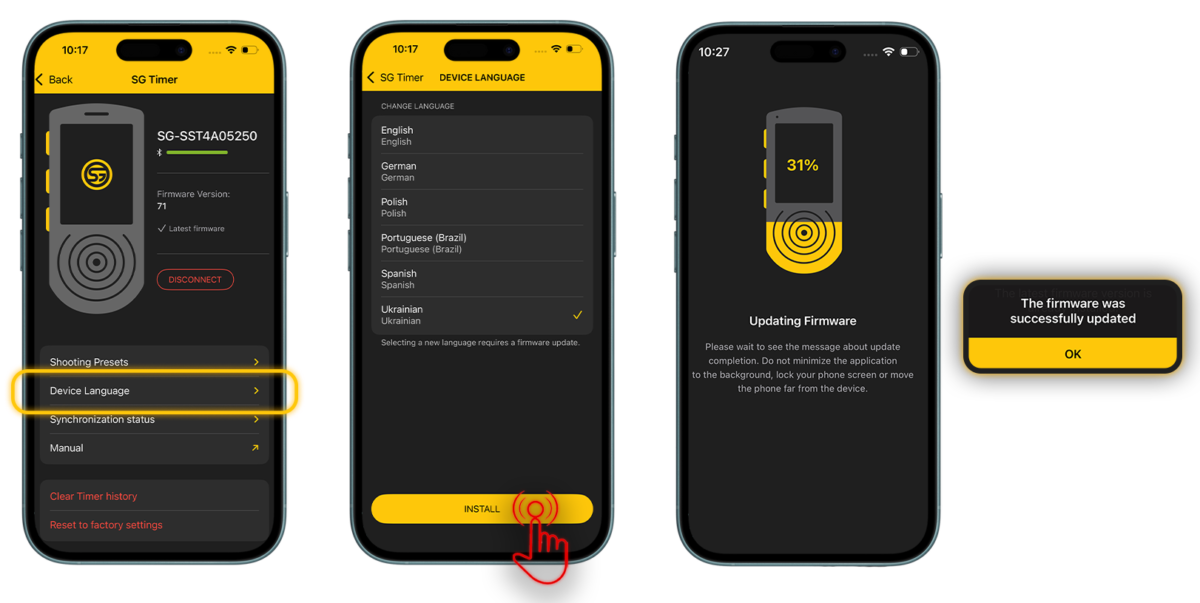
To change the language on your timer, please follow these steps:
🔸 Connect your timer to the Drills App;
🔸 Navigate to My Devices > SG Timer;
🔸 Select the Device Language menu, choose your preferred language, and tap Install.
🔸Wait for the firmware update to complete on the timer.
Please note that only one language can be installed on the device at a time.
The timer currently supports English, Spanish, Ukrainian, German, Portuguese (Brazil), Polish and Italian languages.
The Drills app also supports English, Spanish, Ukrainian, German, Portuguese (Brazil), Polish and Italian languages.
You can choose your preferred app language independently of your system settings. Simply go to Settings in the Drills app, select Language, and choose the one you need.